Mission control
for coding agents.
Every session, subagent and background agent on one live map, on your machine.
Claude Code · Codex · Gemini CLI · Antigravity · opencode
Every run ends in a receipt.
The night shift
Agents work while you sleep. Most of the time.
02:14Your CEO agent splits the epic and spawns three researchers.
02:16One of them stops at a permission prompt.
07:40You find it. Five hours, zero progress, one question unanswered.
02:16With SwarmCorp, that pane turns amber. The log says who is waiting, and for what.
Instruments
Six instruments. One floor.
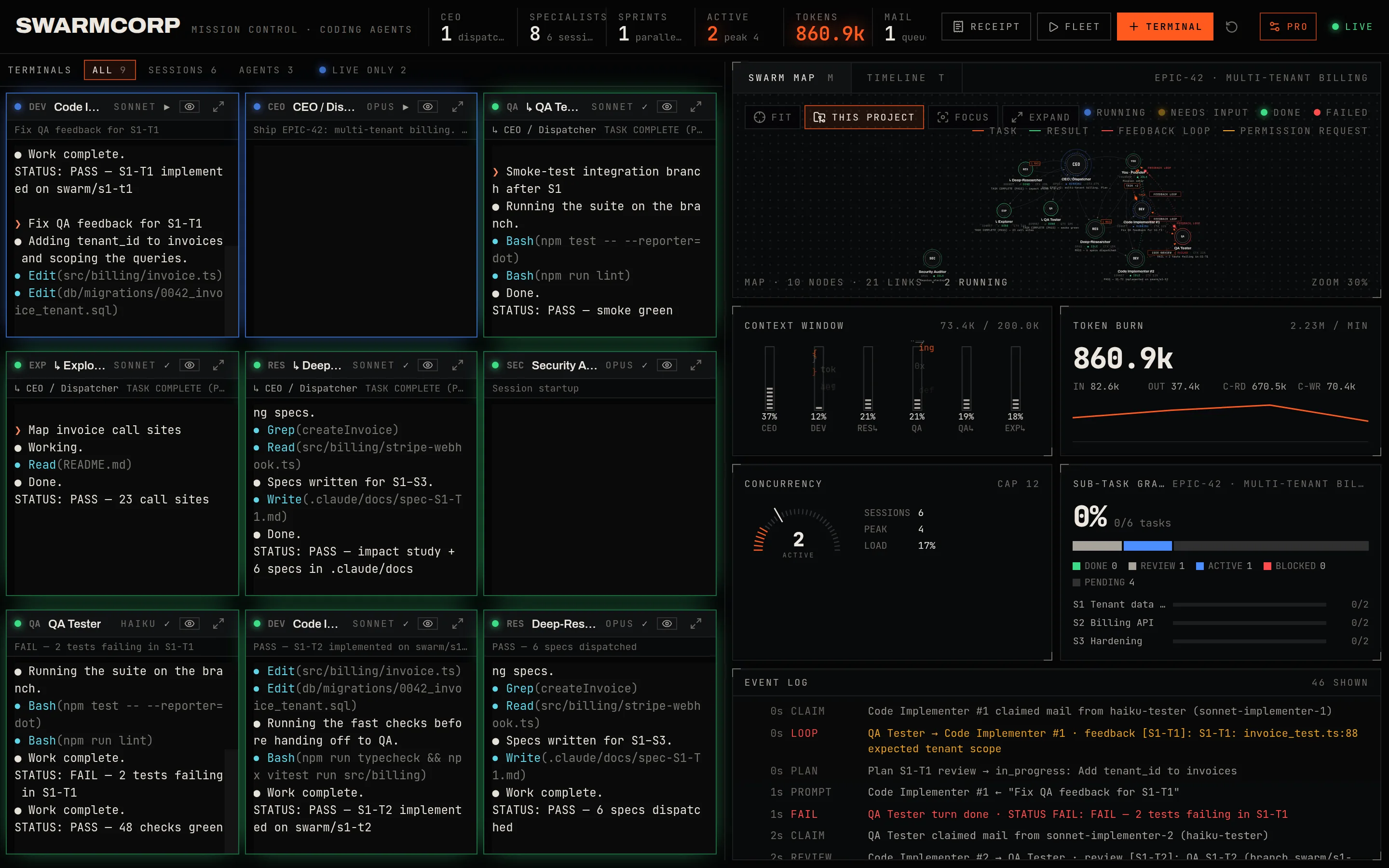
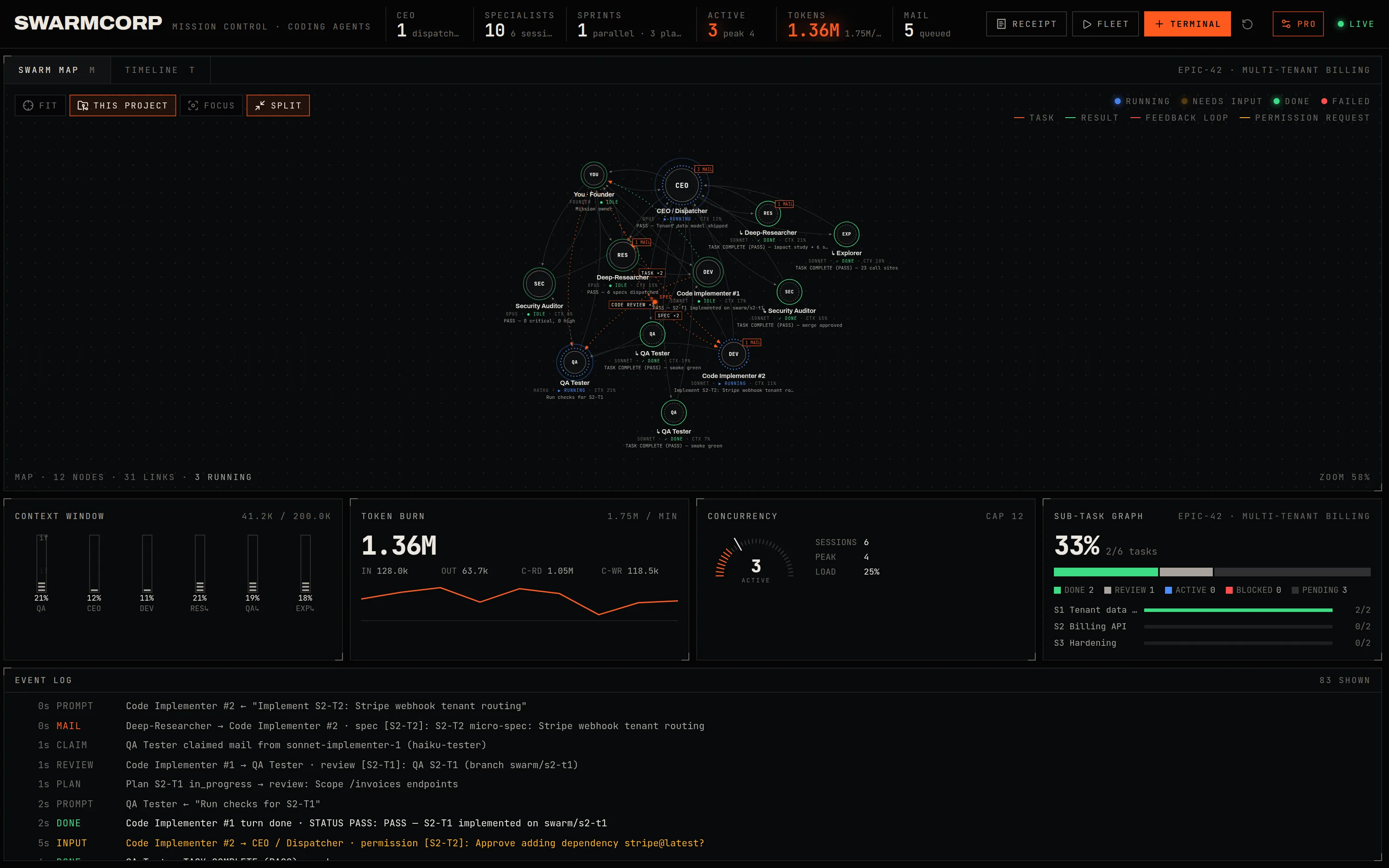
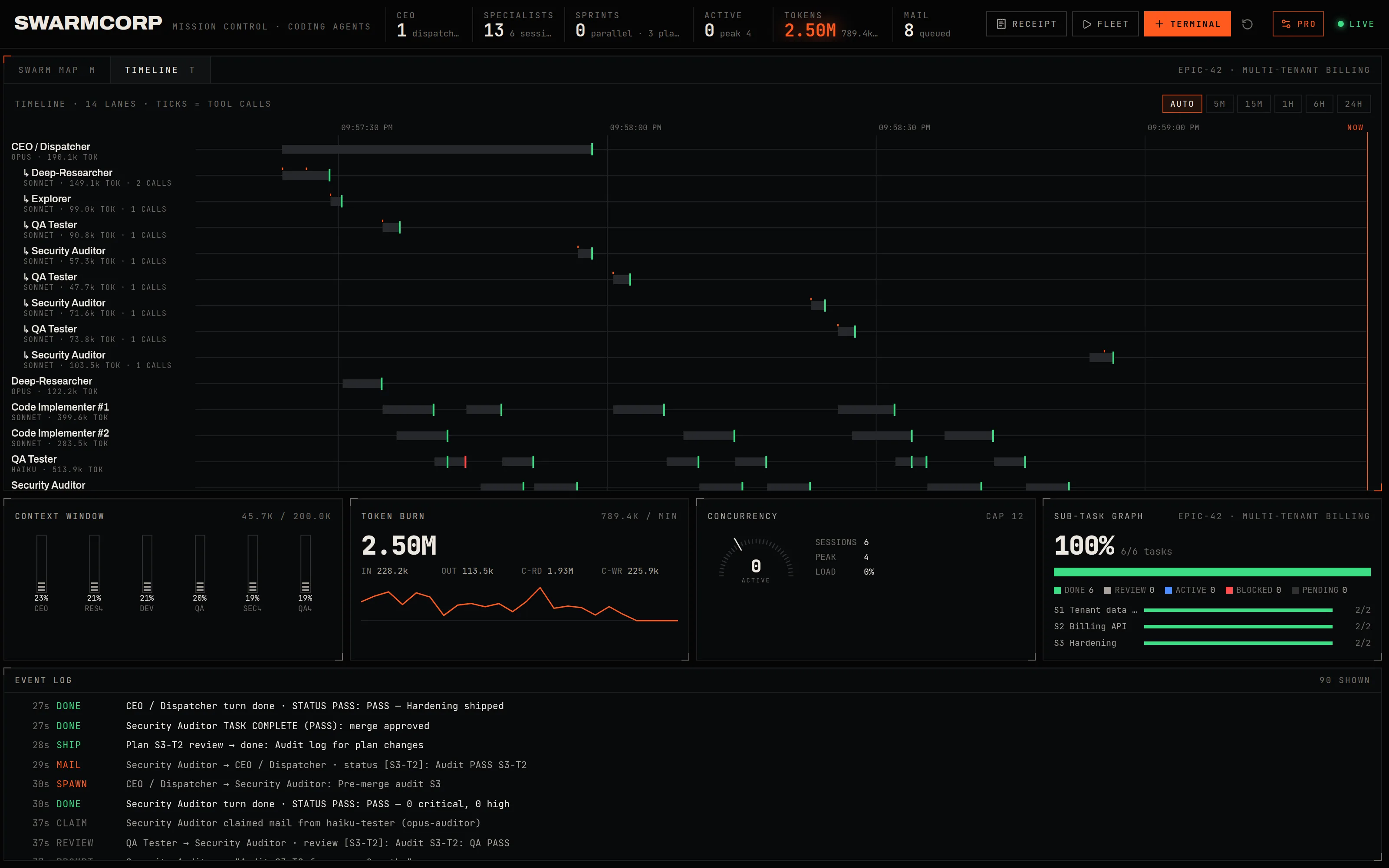
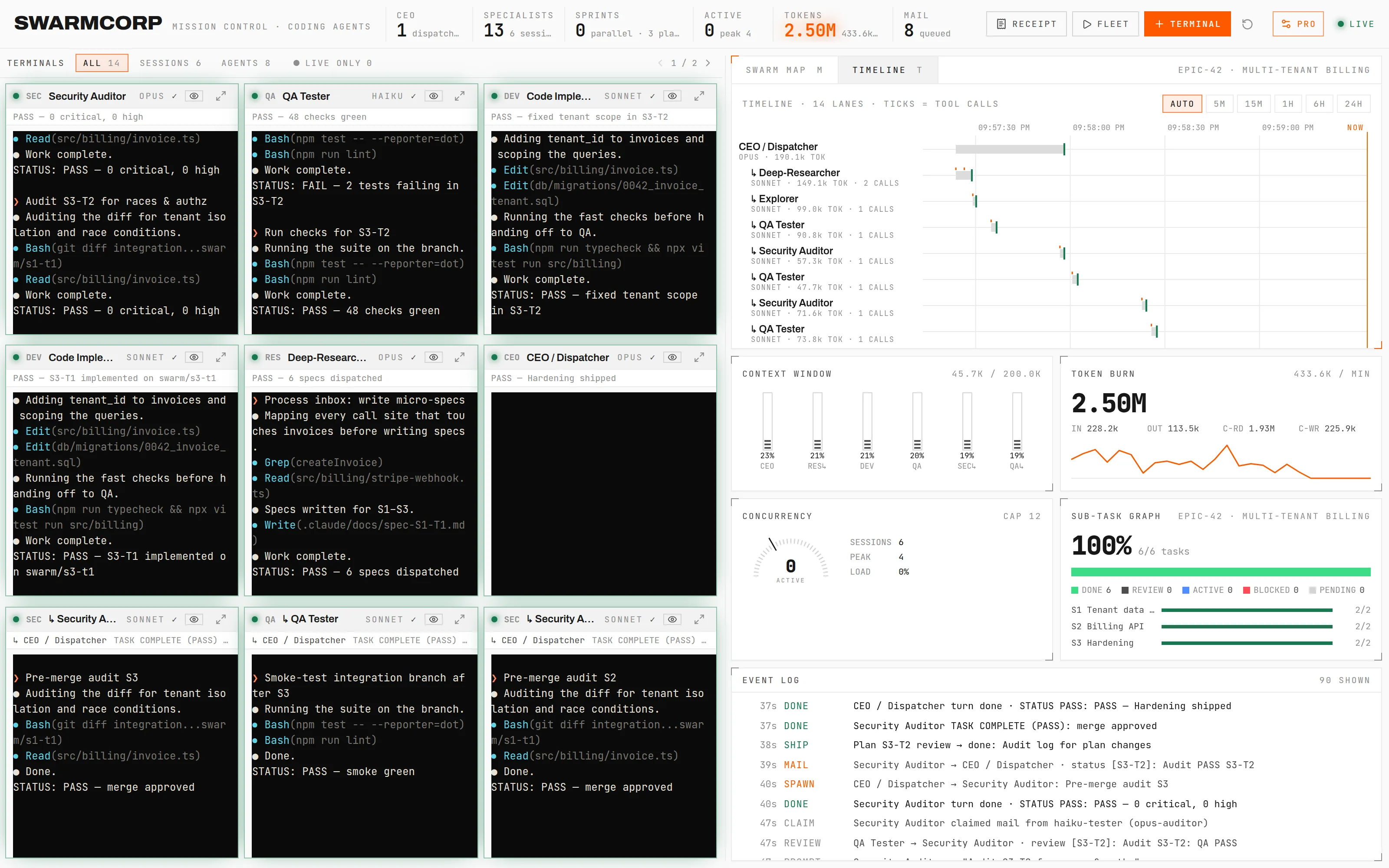
Real captures of v0.4, running the built-in demo (swarmcorp simulate). No mockups. Click to open full size.
- 01
Swarm map
Every session and every subagent run is a node. Delegations, code reviews, failures and permission requests travel the links as they happen.
SubagentStart · SubagentStop · Notification - 02
Timeline
One lane per turn and per agent run. Orange ticks are tool calls. Find the researcher that sat on one Bash call for nine minutes.
Turns · runs · tool calls - 03
Context meters
How full each agent's context window is, read from its own transcript. The meter says FULL before your agent starts forgetting.
Input + cache tokens per request - 04
Terminals and mirrors
Launch claude --agent panes from the dashboard, or keep working in your own terminal. Your session shows up as a read-only live mirror.
xterm.js · node-pty - 05
Dispatch queue
Agents message each other through small JSON files with atomic claims, instead of sharing one giant context. Idle panes wake when mail arrives.
.claude/swarm-inbox/ - 06
Run receipts
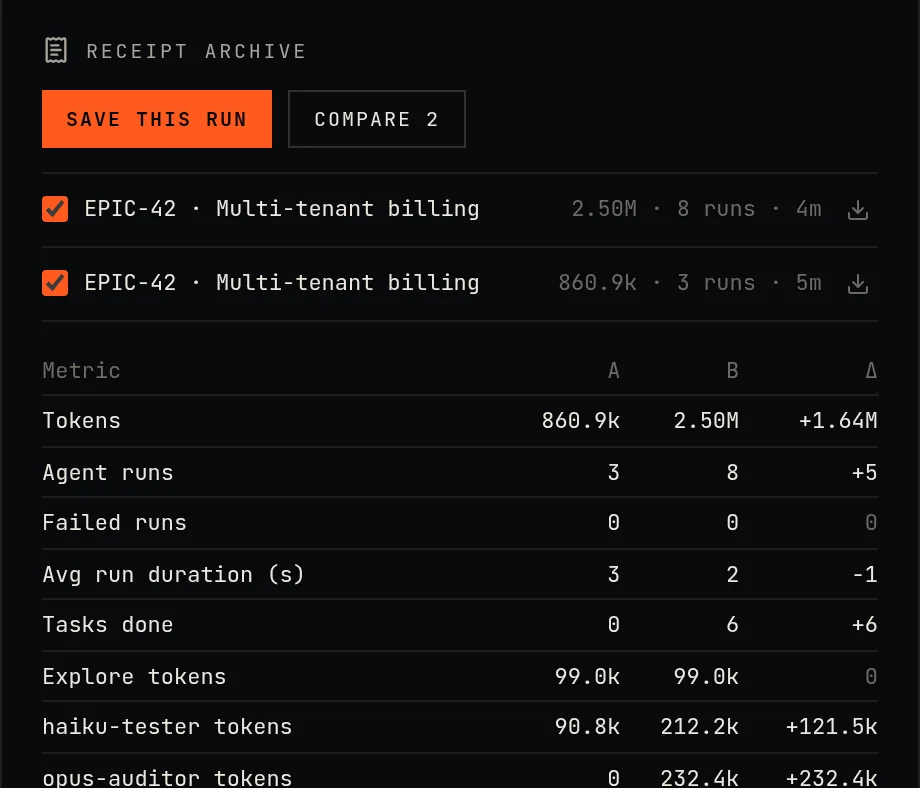
One click exports a Markdown receipt of the run: every agent, task, start time, duration, token count and result. Paste it into the pull request.
GET /api/receipt
Agent counts are cheap. Run logs aren't.
Posts about 400-agent swarms rarely show the log behind the number. SwarmCorp writes the log down. Every figure on screen traces back to a hook event or a transcript line on your disk, and the receipt shows all of it.
Read the essay| Agent | Time | Tokens | Result |
|---|---|---|---|
| Deep-Researcher · S0-T1 | 6m 12s | 181,587 | PASS |
| Deep-Researcher · S0-T2 | 9m 40s | 226,014 | PASS |
| Implementer #1 · S1-T1 | 4m 03s | 98,420 | FAIL |
| Implementer #1 · S1-T1 | 2m 51s | 61,305 | PASS |
| QA Tester · S1-T1 | 0m 48s | 19,882 | PASS |
| Security Auditor · S1-T1 | 3m 30s | 74,118 | PASS |
Local by design
It can open shells. So it's strict.
Stays on your machine
The hub binds 127.0.0.1. No account, no analytics, no cloud component.
Never blocks your agent
The hook relay gives up after 0.8 s and always exits 0. Dashboard off? Your agent carries on.
Locked to localhost
Host and Origin checks stop DNS rebinding, cross-site WebSocket hijacking and CSRF.
Reversible
The installer backs up ~/.claude first. --uninstall removes every hook it added.
Install
Three commands. Then watch.
$ git clone https://github.com/KunalSiyag/swarmcorp.git swarmcorp && cd swarmcorp && npm install && npm run build && npm link$ swarmcorp init$ swarmcorp start --project ~/code/your-appThen run swarmcorp open (the dashboard picks a free port, 4317 by default) and start your coding agent in that project. Undo everything with swarmcorp uninstall.
Pricing
Free to run. Pay once for Pro.
- ✓Live swarm map and timeline
- ✓Context meters per agent
- ✓Up to 12 terminals, plus live mirrors
- ✓File-based dispatch queue
- ✓Run receipts for the current run
- ◆Everything in Free
- ◆Run history that survives restarts
- ◆Receipt archive, with run-to-run compare
- ◆Switch projects without restarting the hub
- ◆Daylight theme
- ◆A receipt saved automatically when the hub stops
Pay with Dodo Payments. Your licence key arrives by email and on the receipt page: paste it into Settings. It's activated once with Dodo, then re-checked about once a day, and keeps working offline for 30 days. No account. How Pro works.
From the log
Field notes on running agent fleets.
- A file queue, not a giant contextEngineering · 5 minWhy SwarmCorp agents talk through small JSON files instead of sharing one prompt: smaller contexts, atomic claims, a STATUS line on every turn, and feedback that goes straight back to the owner.
- Six agents, one laptopGuide · 5 minHow to run a CEO, a researcher and two implementers on a 16 GB laptop without the fan taking off: in-process subagents, background runs, idle sessions and MCP servers.
- Agent counts are cheap. Run logs aren't.Essay · 5 minA post says 400 agents shipped a product overnight. Here is how to check a claim like that, and what SwarmCorp writes down so your own numbers hold up.
- 12 workflow tips for Claude Code fleets
Questions
Before you install.
Does SwarmCorp send my code or prompts anywhere?+
No. The hub binds to 127.0.0.1 and has no account, no analytics and no cloud. It reads the hook events of your agents and the transcript files already on your disk.
Does it cost tokens?+
No. SwarmCorp never calls a model. It watches the sessions you run; the token numbers it shows are the ones your agents already recorded.
Which agents does it support?+
Claude Code, OpenAI Codex CLI, Gemini CLI, Google Antigravity (agy) and opencode. `swarmcorp init` connects every one it finds on your machine. Claude Code gets the most: launching role terminals and the dispatch queue are Claude-only for now.
Does it work with my subscription?+
Yes. SwarmCorp never touches authentication. It observes the CLIs you already use, logged in however you like.
What happens when the dashboard is off?+
Nothing you would notice. The hook relay gives up after about 0.8 seconds and always exits 0, so Claude Code never waits on it.
How does the Pro licence work?+
You buy once through Dodo Payments and get a licence key by email and on the receipt page. Paste it into Settings and Pro unlocks immediately. Lost the email? The billing portal on the Your licence page lists your key again. The key is activated once with Dodo (it sends the key and your machine name, nothing else), re-checked about once a day, and keeps working offline for 30 days.
Which platforms?+
macOS and Linux with Node 20 or newer. Windows is untested.
Is this an Anthropic product?+
No. SwarmCorp is independent and is not affiliated with or endorsed by Anthropic.